MiniPlayv1.0.0

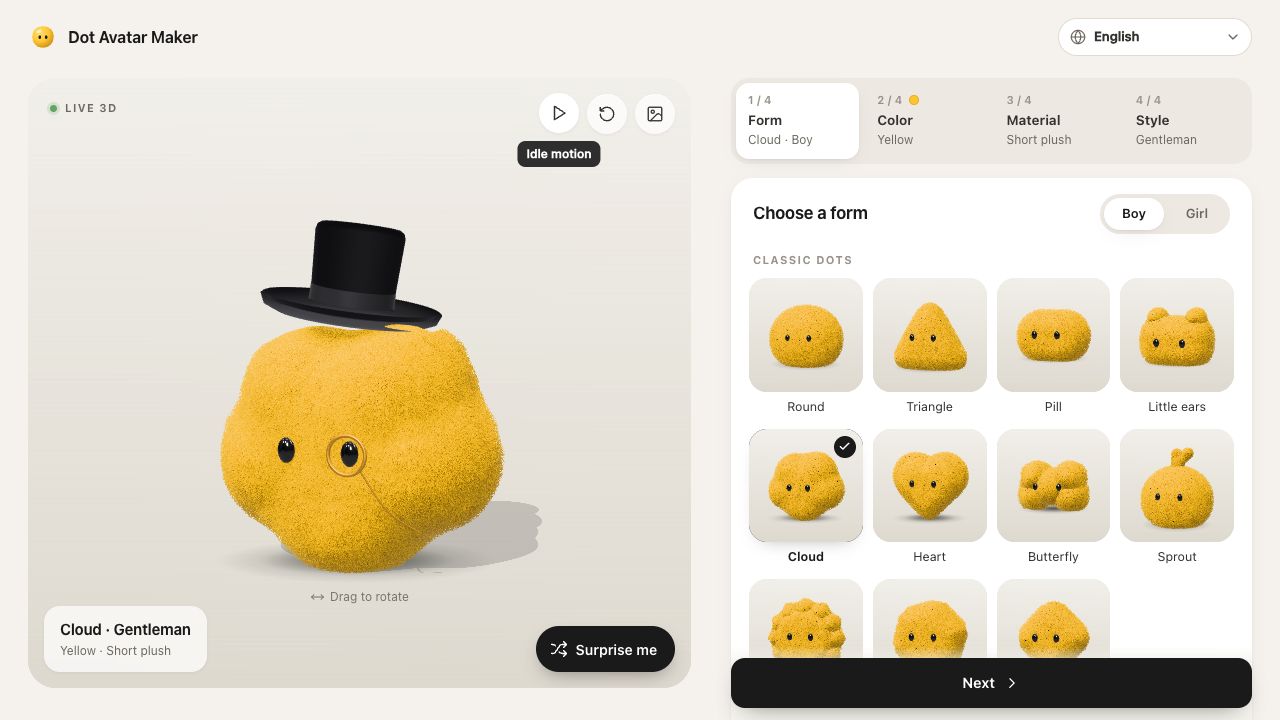
Three proven mini game types: reveal (open blind boxes or oysters and collect by rarity), fidget (pop, punch, press with combos) and catch (catch the good, dodge the bad against the clock).

See what you can make

Made with this SkillA one-file HTML5 game, a playtest on three screens, a 3:4 cover and a preview GIF

Three games, 17–23 KB, played to the end

Open full example

What you get

A one-file HTML5 game, a playtest on three screens, a 3:4 cover and a preview GIF

What you can make

  • Three proven mini game types: reveal (open blind boxes or oysters and collect by rarity), fidget (pop, punch, press with combos) and catch (catch the good, dodge the bad against the clock).
  • Builds one self-contained HTML file with touch, mouse and keyboard controls, synthesized sounds, haptics, particles, best scores, a result screen and a save-image share card, in English or Chinese.
  • A bot plays every build to the end on a phone, a small phone and a tablet, reporting errors and frame rate, and saves a 3:4 cover and a preview GIF.
Explore delivered files5 groups
  • index.html: the whole game, images inlined, works offline
  • cover.png: a 1080 × 1440 frame of play
  • preview.gif: a few seconds of play
  • report.md: the bot's playtest on a phone, a small phone and a tablet
  • Three example games: reveal, fidget and catch

Good fit

Creators, brands and shops making viral mini games for Xiaohongshu, Douyin, a link in bio or a website.

Know the limits

Short single-screen games; no multiplayer, accounts, payments or shared leaderboards. Platform rules for mini tools change; check them before submitting.

About this skill

Your agent helps you choose a game people get in ten seconds and writes its settings: a reveal game where a box, egg or oyster opens after a few taps and gives a reward by rarity until a set number of opens, a fidget toy with a grid to pop, punch or press round after round with combos, or a catch game where you move along the bottom catching good things and dodging bad ones against the clock. Items are emoji or your own PNG, SVG or WebP art. MiniPlay builds one HTML file with everything inlined and nothing linked, with touch, mouse and keyboard controls, synthesized sounds, vibration, particles, best scores kept on the phone, a result screen showing the collection or score, and a save-image share card, in English or Chinese. A bot then plays the whole game on a phone, a small phone and a tablet, reporting errors, frames per second and whether it finished, and saves a 1080 × 1440 cover and a preview GIF. Requires Node.js 20+, and Chrome or Chromium for the playtest.

FROM PACKAGE TO FIRST RESULT

Your first result, with your agent

Choose a starting point, add the content you already have, then let your agent check the setup and create one result.

View example result

Purchase access is required. Unzip the package into the project folder below, or let your agent follow the installation guide. .agents/skills/miniplay

Your project name, audience and the content or images you already have are enough to start. Your agent will ask for anything essential that is missing.

3. Let your agent guide the first result

Package location: .agents/skills/miniplay

Use MiniPlay to make a Chinese blind-box mini game for a Xiaohongshu post. Start from examples/lucky-oyster/game.json.

Use a new output folder and preserve existing files. Inspect the actual deliverables (index.html: the whole game, images inlined, works offline, cover.png: a 1080 × 1440 frame of play, preview.gif: a few seconds of play), open the visual result and explain failed checks. An incomplete dependency check is not a successful result. Ask before paid services and do not publish automatically.
Before calling it done
  • Dependencies checked before rendering
  • Actual files open and work with your content
  • Editable source saved in a new folder
Made your first result? Share your experience →
Installation options & technical requirements

Start with your agent

Give this request to Claude Code, Codex or Cursor. Your agent can collect the missing details and guide your first result.

Use MiniPlay to make a Chinese blind-box mini game for a Xiaohongshu post. Start from examples/lucky-oyster/game.json.

Purchase access is required to install the package. Technical commands are available below when you need them.

US$4.99 · MIT licenseNode.js 20+ · Chrome or Chromium for the playtest · no API keyNo API key or paid provider
  1. 01

    Choose your agent

    These steps use a project folder. Open the project in your agent and run terminal commands from its root.

    Codex directory guide

    Package folder .agents/skills/miniplay

  2. 02

    Add the package

    Download and unzip the package into the folder above. Keep all its files together, with SKILL.md directly inside that folder.

    Downloads require a verified account and purchase access. Choose a new folder if this Skill is already installed.

  3. 03

    Run the included sample

    Manual sample commands and technical details

    Read SKILL.md, review the generator and check its runtime requirements before running:

    cd .agents/skills/miniplay
    npm install (playwright-core)
    node scripts/build.mjs --input examples/lucky-oyster/game.json --output ./lucky-oyster
    Your first result

    Play index.html on a phone, then publish it where the platform accepts an HTML mini game and post the cover.

    The games and art are original. Platforms set and change their own rules for mini tools; check the current requirements before submitting.

    If lucky-oyster already exists, change the output to ./lucky-oyster-2. Existing files are never overwritten.

    Prefer to ask your agent?

    Use MiniPlay to make a mini game I can post: help me pick a reveal, fidget or catch game, write its settings and art, build it into one HTML file, and have a bot play it to the end on phone screens before I publish.

Reviews

Share your first result

Tried this workflow? Help others decide with an honest review.

Before you choose this Skill

How do I get MiniPlay?

The listed individual package price is USD 4.99. Premium downloads require a confirmed purchase or active membership. Your agent subscription, model access and external provider credits are separate.

Which agents can use this skill?

This release lists Codex, Claude Code, Cursor as intended installation hosts. Check the package’s dependencies and permissions before running it. These labels do not certify that every workflow has been tested in every agent.

What files can this workflow generate?

The documented 1.0.0 workflow lists: index.html: the whole game, images inlined, works offline; cover.png: a 1080 × 1440 frame of play; preview.gif: a few seconds of play; report.md: the bot's playtest on a phone, a small phone and a tablet; Three example games: reveal, fidget and catch. Some files or exports are optional; follow the package’s setup and inspect the delivered result.

What should I check before using the result?

The games and art are original. Platforms set and change their own rules for mini tools; check the current requirements before submitting.

$4.99One-time purchase